URL Encoder Spell Mistake: 11 Common Errors, Causes, and Easy Fixes
Picture a shopper typing “red shoes & socks” into a search box. The page shows results for “red shoes” only. The socks vanish. One small URL encoder spell mistake caused it. An unencoded ampersand split the query in two. Slips like this break search forms, login links, redirects, and API calls. They also hurt rankings.
Many people search for a URL encoder spell mistake fix using odd terms. Common ones are url encoder spellmistake and url decoder spellmistake. Read on to clear up the confusion. You will see how percent encoding works. You will learn why URL encoding errors appear and how to repair them. You will also get encoded URL examples, code samples, and a simple URL troubleshooting plan.
What Is a URL Encoder Spell Mistake?
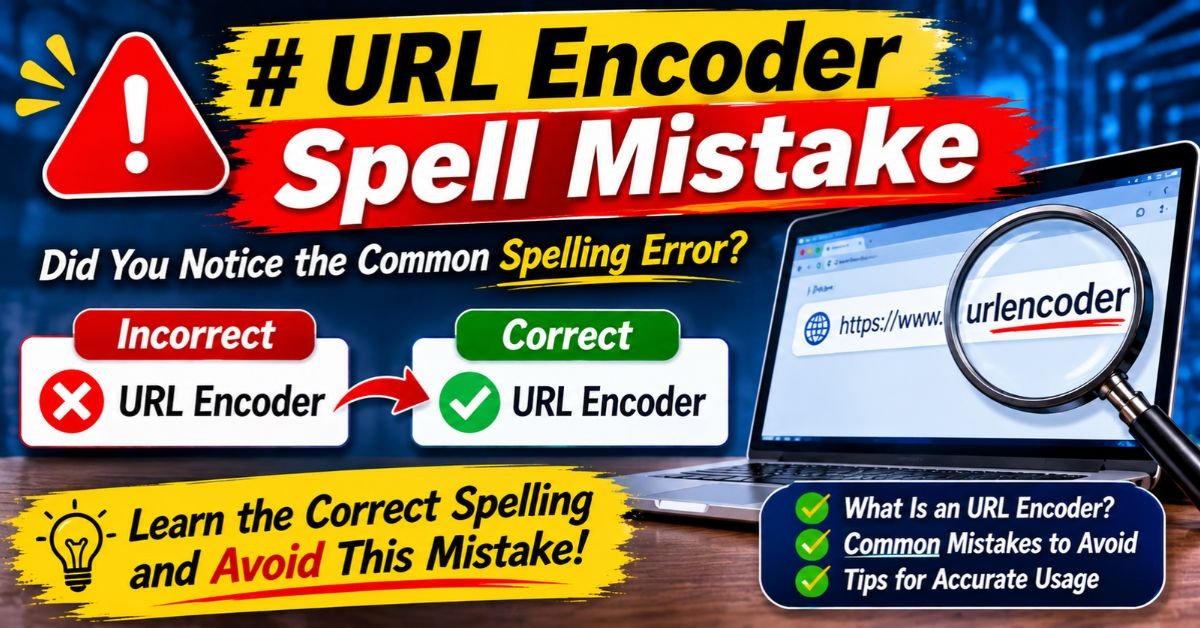
A URL encoder spell mistake is an error in how a web address gets encoded. It rarely involves real spelling. The word “spell” hints at a wrongly written code such as %2G or a missing digit. Nearly every case comes down to broken percent encoding. Note that this phrase is not an official technical term. Developers also call the problem URL encoding problems or URL syntax errors.
The damage can be big. A broken value may cut a search query short. It can send a visitor to the wrong page. It can also make an API reject a request. Even a tiny invalid URL format can trigger these failures. Knowing the cause behind each URL encoder spell mistake saves hours of guessing. The next sections cover URL encoder spell mistake causes and solutions step by step.
How URL Encoding Works (Percent Encoding Explained)
URLs can only carry a small set of safe characters. Letters, digits, and a few symbols pass freely. Everything else needs protection. Percent encoding supplies it. It swaps a risky character for a percent sign plus two hex digits. Think of it as bubble wrap around a fragile gift. The gift stays the same. The wrap only keeps it safe in transit. The RFC 3986 document defines these URL percent-encoding standards.
The flow is simple. The browser encodes the input. The server receives the request. Then the server decodes the value for the app. This URL encoding and decoding cycle should run once in each direction. Any extra step creates a URL encoder spell mistake. Sound URL encoding best practices keep the cycle clean from start to finish.
The Role of Percent Encoding in URLs
The standard splits characters into two groups. Unreserved characters (letters, digits, hyphen, period, underscore, and tilde) never need encoding. Reserved characters such as /, ?, #, &, and = carry special meaning. When they act as data instead of structure, they need encoding. Use the correct percent-encoding format: a percent sign followed by two hex digits.
How Special Characters Are Converted
Each risky character turns into its byte value in hex. The result gets a percent sign in front. This is special character encoding at its simplest. Learn the common ones below. They explain how to encode special characters in URLs without a tool. Uppercase hex is the standard style. Typed lowercase codes often start a URL encoder spell mistake.
| Character | Encoded Form | Why It Matters |
| Space | %20 | Raw spaces break links |
| % | %25 | Starts every escape code |
| & | %26 | Separates query parameters |
| ‘ | %27 | Apostrophe in names and text |
| + | %2B | Often read as a space |
| / | %2F | Separates path parts |
| # | %23 | Starts the fragment |
| = | %3D | Joins keys and values |
| ? | %3F | Starts the query string |
| @ | %40 | Appears in email addresses |
URL Encoding vs. URL Decoding
URL encoding versus URL decoding is a simple two-way street. Encoding makes data safe to send. Decoding restores the original text after delivery. A good URL decoder reverses each escape code into its character. The URL decoding process should happen once per layer. Decoding twice, or decoding too early, produces a classic URL encoder spell mistake.
| Task | Encoding | Decoding |
| Purpose | Make data URL-safe | Restore original data |
| Timing | Before sending | After receiving |
| Example | John Smith → John%20Smith | John%20Smith → John Smith |
| Typical risk | Missing or double encoding | Decoding twice or too early |
The Role of UTF-8 in URL Encoding
Modern web pages use UTF-8 for text. UTF-8 URL encoding first turns each character into bytes. Then it percent-encodes every byte. The letter é becomes %C3%A9. An emoji uses four bytes and becomes %F0%9F%98%80. This UTF-8 character conversion keeps names and symbols intact. Mixed charsets create UTF-8 and Unicode URL compatibility trouble. That trouble is a quiet URL encoder spell mistake.
When to Use %20 vs. + for Spaces
Use %20 when you want a safe space anywhere in a URL. It works in paths and in query strings. The plus sign means a space only in form-style data. That format is called application/x-www-form-urlencoded. In a path, a plus sign stays a plus sign. Mixing the two rules is a frequent URL encoder spell mistake.
11 Common URL Encoder Spell Mistake Problems
Most bugs fall into a few repeat patterns. Teams hit the same walls again and again. Each pattern below shows a different URL encoder spell mistake with its own cause. These are the most frequent URL encoding error causes seen in real projects. Spot the pattern early and the fix often takes minutes.
The table gives a quick map. Each row links a problem to its usual cause and its quick fix. Use it for fast malformed URL troubleshooting guide style checks. The sections after it explain every row in detail. This is how to fix URL encoding errors with confidence instead of trial and error.
| # | Problem | Usual Cause | Quick Fix |
| 1 | Incorrectly encoded spaces | Raw space or wrong + | Use %20 |
| 2 | Unencoded special characters | Data treated as structure | Encode each value |
| 3 | Invalid percent sequences | Missing hex digits | Use two hex digits |
| 4 | Misspelled encoded values | Hand-typed codes | Use a function |
| 5 | Double encoding | Two layers encode | Encode once |
| 6 | Broken query parameters | Bad separators | Build with a library |
| 7 | Unicode errors | Charset mismatch | Standardize UTF-8 |
| 8 | Incorrect URL construction | String concatenation | Use a URL builder |
| 9 | Frontend and backend conflicts | Unclear ownership | Define one owner |
| 10 | Improper decoding | Decoding twice | Decode once |
| 11 | API request errors | Unsafe query strings | Encode every value |
Incorrectly Encoded Spaces
A raw space inside a URL is illegal. Browsers often patch it silently. Scripts and servers do not. Another version of the URL encoder spell mistake swaps %20 and + in the wrong place. Aim for correct encoding of spaces in URLs. Use %20 in paths and for safety everywhere. Keep the plus sign for form-style query strings only.
Unencoded Special Characters
An unencoded ampersand splits one value into two parameters. An unencoded hash cuts off everything after it. The server never sees the fragment. Special characters in URLs need encoding whenever they act as data. The rule is simple. If the character belongs to the value, encode it. This single habit prevents many URL encoding errors. Forgetting it is the most common URL encoder spell mistake.
Invalid Percent-Encoding Sequences
Every escape code needs a percent sign plus exactly two hex digits. Codes like %2, %ZZ, or a lone % are invalid percent-encoding sequences. Strict parsers reject them. In JavaScript, decodeURIComponent throws a “URI malformed” error. Python’s unquote quietly leaves them alone. Both behaviors hide a URL encoder spell mistake in different ways.
Misspelled or Incorrect Encoded Values
Hand-typed codes invite typos. A developer may write %2G when %2F was meant. Another may type %23 for an ampersand. These slips are the truest URL encoder spell mistake of all. The letter G is not a hex digit. Always let a function generate codes. A URL encoder tool or URL encoding checker can confirm the result.
Double URL Encoding
Double URL encoding happens when encoded text gets encoded again. The percent sign turns into %25. So %20 becomes %2520. Two libraries often cause it. A framework that re-encodes a ready link does the same. These double encoding problems show readable text like hello%20world on screen. They also break lookups. Learn how to fix double-encoded URLs in the fix section below.
Broken Query Parameters
A clean query string starts with one question mark. Pairs follow, joined by ampersands. Extra question marks, missing equals signs, or raw ampersands cause URL parameter errors. Good URL query string formatting treats each key and value separately. Encode them one by one. Then join them. This order protects your URL query parameters. A messy query string is a textbook URL encoder spell mistake.
Character Encoding and Unicode Errors
Old systems may use Latin-1 while new ones use UTF-8. The letter é becomes %E9 in one and %C3%A9 in the other. The mismatch produces odd text like José. Doctors call it mojibake. Developers call it a bad day. Pick UTF-8 across the browser, server, and database. That choice fixes most UTF-8 URL encoding issues. Mixing charsets stays a hidden URL encoder spell mistake.
Incorrect URL Construction
Joining strings by hand feels quick. A line like “https://shop.com?q=” + term looks harmless. It fails the moment term holds an ampersand. Hand-built links cause a steady stream of URL encoder spell mistake reports. Use a URL builder or a query helper instead. That habit delivers safe URL construction every time.
Frontend and Backend Encoding Conflicts
The frontend may encode a value. The backend may encode it again. Or neither side may encode it. These frontend and backend encoding conflicts are very common. Each team assumes the other one handles it. Agree on a single owner for each step. Write the rule down. A clear contract ends the finger-pointing. Each overlap otherwise becomes a URL encoder spell mistake.
Improper URL Decoding
Decoding has traps too. Decode a whole URL first and %26 turns into &. The query then splits in the wrong place. Decoding before validation also opens security holes. Split the URL first. Decode each part once. This careful URL decoding process avoids both bugs. It also removes a sneaky URL encoder spell mistake.
See Also : CNLawBlog 2026 Review: The Ultimate Guide to a Trusted Legal Information Source
Encoding Errors in API Requests
APIs read query strings strictly. Base64 tokens contain +, /, and =. Those characters break unless encoded. Signed requests fail when the sender and receiver encode differently. These are typical API request encoding errors. Strong URL encoding for API requests means encoding every value. Test each endpoint with tricky input like spaces, symbols, and emoji.
URL Encoding Examples: Correct vs. Incorrect
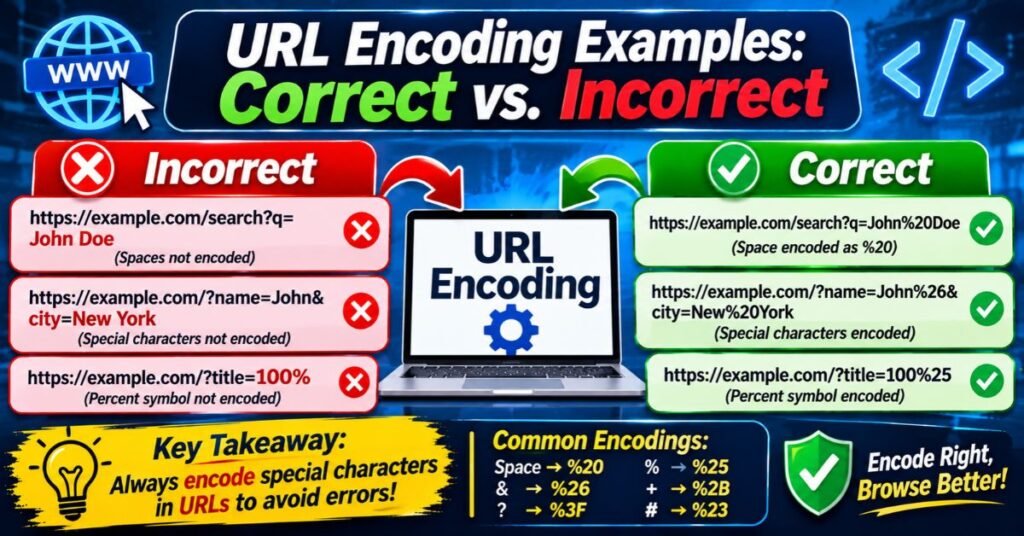
Seeing right and wrong side by side makes the rules stick. The samples below come from daily development work. They show how a tiny change flips a broken link into a working one. Each broken sample is a small URL encoder spell mistake. Each one is a URL encoding example for developers that you can test in minutes.
Copy any example into a URL encoding checker and compare the output. Try it with your own text too. Hands-on practice builds instinct fast. You will start to spot a URL encoder spell mistake at a glance. Soon the pattern feels as obvious as a typo in a headline.
Encoding Spaces and Special Characters
Compare the raw value with the safe one. The right column is what the URL encoding characters should look like. The wrong column shows the URL encoder spell mistake that breaks the request. Notice that + in an email address needs %2B. Otherwise the server reads a space.
| Original Value | Correct Encoding | Incorrect Form |
| red shoes & socks | red%20shoes%20%26%20socks | red shoes & socks |
| New York | New%20York | New York |
| 50% off | 50%25%20off | 50% off |
| user+tag@mail.com | user%2Btag%40mail.com | user+tag@mail.com |
Examples of Invalid Percent-Encoding
These samples fail because they break the two-digit hex rule. Each one is a clear invalid URL format. A strict parser rejects them. A lenient parser guesses and may guess wrong. Never rely on guessing. Every row shows a URL encoder spell mistake in action.
| Broken Code | Why It Fails | Fix |
| Hello%2World | %2W is not valid hex | Hello%20World |
| %2 | One digit only | %20 |
| %2G | G is not a hex digit | %2F |
| 100% sure | Lone percent sign | 100%25%20sure |
How Double Encoding Changes a URL
Follow one phrase through two rounds of encoding. The first round is correct. The second round is the mistake. The percent sign from the first round gets encoded again. That small change turns a readable space into a confusing string. Double encoding is a sneaky URL encoder spell mistake.
Original: hello world
After 1 encode: hello%20world
After 2 encodes: hello%2520world
Broken Query Parameters and Redirects
Redirect links are fragile. Look at login?redirect=https://example.com/cart?id=5&ref=mail. The &ref=mail part now belongs to the login page. It no longer belongs to the cart link. Encode the full target first and the problem disappears: login?redirect=https%3A%2F%2Fexample.com%2Fcart%3Fid%3D5%26ref%3Dmail. The first form is a costly URL encoder spell mistake.
Real-World URL Encoding Failures
Here is a composite case study based on a common pattern. A store emailed discount links ending in ?email=anna+sales@shop.com. The server read the plus sign as a space. The coupon check failed for thousands of subscribers. Support tickets piled up. The team switched to JavaScript encodeURIComponent for every value. Failures dropped to zero within a day. The fix took one line of code.
How to Diagnose URL Encoding Errors
Guessing wastes time. A short routine finds the culprit quickly. Start at the browser. Move to the network. Finish at the server. This URL troubleshooting path narrows the hunt at every step. It also shows whether the bug lives in the frontend or the backend.
Collect evidence before changing code. Save the failing URL. Note the exact input that triggered it. Record the response code. Good notes make the URL encoder spell mistake easy to reproduce. They also help teammates confirm the fix later.
Inspect URLs Using Browser Developer Tools
Open the browser developer tools and click the Network tab. Reload the page and select the failing request. Compare the raw URL with the parsed values. Spot a %25 and you probably have double encoding. The Console also helps. Paste a suspect string into decodeURIComponent to test it. A visible %25 often exposes a URL encoder spell mistake.
Analyze Network Requests and Responses
Study the full request line and the response headers. A 400 error often points to malformed URLs. A redirect with a broken Location header points to a bad redirect link. Tools like curl show the raw exchange. Try curl -v to see exactly what leaves your machine. Every odd character may hide a URL encoder spell mistake.
See Also : CoolKingZone com Review 2026: Features, Content, Safety, and Legitimacy
Review Server Logs and Error Messages
Server logs store the raw request line. That line shows what the server really received. Search for strange percent codes or 400 responses. Compare the logged text with the original input. Differences reveal where a URL encoder spell mistake entered the chain. Frameworks may also print parse errors that name the bad character.
Validate Percent-Encoding Sequences
Scan the string for percent signs that lack two hex digits. A simple regex does it: %(?![0-9A-Fa-f]{2}). Any match is an invalid code and a URL encoder spell mistake. Many teams add this check to unit tests. A URL encoding checker can run the same test in seconds. Catching bad codes early prevents URL syntax errors in production.
Identify Double-Encoding and Decoding Issues
Look for %25 followed by two hex digits, such as %2520. Decode the value once. If escape codes remain, double encoding is likely. Trace where each layer touched the data. Count every encode and decode call. The numbers should match. A mismatch marks the spot where double URL encoding begins.
How to Fix URL Encoder Spell Mistake Problems Step by Step
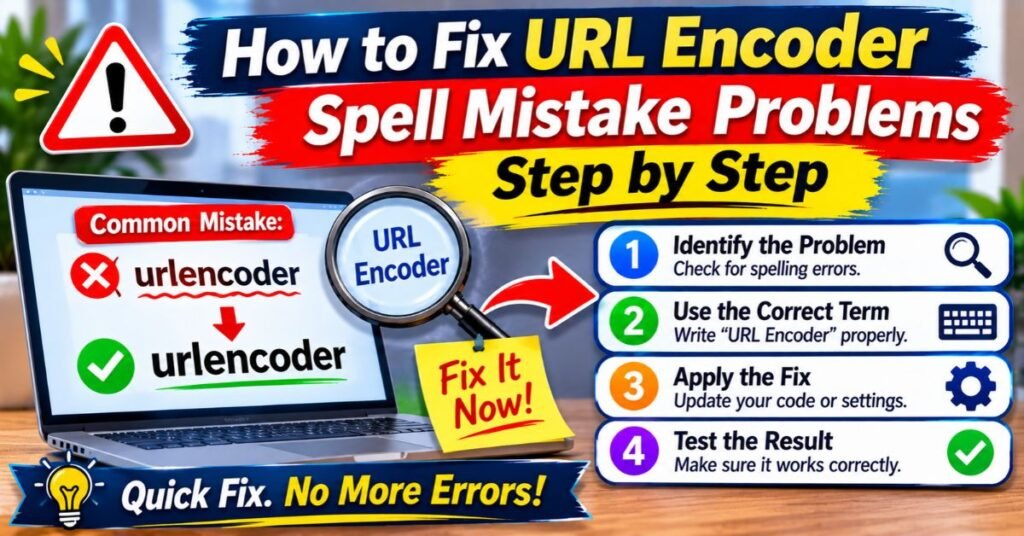
Fixing a URL encoder spell mistake works best as a routine. Each step builds on the one before. Skip a step and the bug may return. The routine below covers how to fix URL encoding errors in any language or framework.
Patience pays off here. Change one thing at a time. Test after each change. That discipline stops new problems from hiding behind old ones. It also builds a clear record of what worked.
Identify the Problematic URL
Find the exact URL that fails. Copy it from the browser bar or the logs. Do not retype it. Retyping can add new typos. Note which action created it. Was it a search, a login, or an API call? Context points to the right code path. Treat that path as the scene of the URL encoder spell mistake.
Locate Invalid or Special Characters
Scan the URL piece by piece. Look for spaces, ampersands, hashes, and percent signs. Check each one against its role. Is it structure or data? Mark every data character that appears raw. Those marks show where the URL encoder spell mistake hides.
Apply the Correct URL Encoding Function
Pick the right tool for the URL part. Use a component-level function for values. Use a full-URL function only for whole links. The URL encoding functions in your language already follow the standard. Let them generate the codes. Never type percent codes by hand.
Decode and Re-Encode the URL Correctly
For a double-encoded link, decode it as many times as it was encoded. Stop when plain text appears. Then encode that raw text exactly once. This is the heart of how to fix double-encoded URLs. Do not decode blindly in a loop. Over-decoding can alter real percent signs in the data. Doing it right ends the URL encoder spell mistake for good.
Test Query Parameters, Login Links, and Redirects
Test the fix with nasty input. Try spaces, ampersands, plus signs, accents, and emoji. Check search boxes, login links, and redirect targets. Confirm the server receives the original value. Also confirm the final page loads. One passing test with plain words proves very little. A hidden URL encoder spell mistake survives easy tests.
Verify Fixes Across Browsers and Environments
Different browsers treat edge cases differently. Test in at least two. Check staging and production too. Proxies, CDNs, and load balancers can change URLs. Run the same test through each hop. That wide net catches the last hidden URL encoder spell mistake.
URL Encoding in Different Programming Languages
Every major language ships built-in helpers. They follow the standard and save you from hand coding. Yet they behave differently. Some turn spaces into %20. Others turn them into +. Knowing the difference is the heart of programming language URL encoding methods.
The table shows the main options at a glance. It compares what each function returns for a space. Use it before you pick a helper. The wrong choice is a quiet source of a URL encoder spell mistake. Use the right encoding and decoding functions for the job.
| Language | Function | Space Becomes | Best Use |
| JavaScript | encodeURIComponent | %20 | Single values |
| JavaScript | encodeURI | %20 | Whole URLs |
| PHP | rawurlencode | %20 | Paths and values |
| PHP | urlencode | + | Form data |
| Python | urllib.parse.quote | %20 | Paths and values |
| Python | quote_plus | + | Form data |
| Java | URLEncoder.encode | + | Form data |
| C# | Uri.EscapeDataString | %20 | Paths and values |
| C# | HttpUtility.UrlEncode | + | Form data |
Safe URL Encoding in JavaScript
JavaScript encodeURIComponent is the go-to choice for single values. It encodes reserved characters such as &, =, and ?. It leaves letters, digits, and a few symbols alone. JavaScript encodeURI is different. It keeps structural characters like ? and & intact. Use it only for a full address. See the MDN reference for the full list.
encodeURIComponent(“red shoes & socks”);
// “red%20shoes%20%26%20socks”
URL Encoding in PHP
The PHP urlencode function turns spaces into plus signs. It suits form data. For paths and most values, use rawurlencode instead. It follows the RFC and returns %20. Mixing the two is a popular URL encoder spell mistake in PHP shops. Check the PHP manual when unsure.
rawurlencode(“red shoes & socks”);
URL Encoding in Python
Python urllib.parse.quote uses %20 for spaces. It also keeps the slash safe by default. For query values, pass safe=”” so slashes get encoded too. The quote_plus function swaps spaces for plus signs. The Python docs explain both.
from urllib.parse import quote
quote(“red shoes & socks”, safe=””)
# ‘red%20shoes%20%26%20socks’
URL Encoding in Java
Java URLEncoder was built for HTML form data. It turns spaces into plus signs. Pass StandardCharsets.UTF_8 to avoid a checked exception on Java 10 and newer. For a path, swap each plus for %20 afterward. Skipping that step is a common URL encoder spell mistake in Java code.
String s = URLEncoder.encode(“red shoes & socks”, StandardCharsets.UTF_8);
URL Encoding in C#
C# URL encoding offers two main paths. Uri.EscapeDataString follows the RFC and returns %20. HttpUtility.UrlEncode returns plus signs and lowercase hex. Pick the first for paths and values. Pick the second only for form-style data. Teams that mix them see odd URL encoding problems between services.
Uri.EscapeDataString(“red shoes & socks”);
// “red%20shoes%20%26%20socks”
Choosing the Right Encoding Function for Each URL Component
Each URL part has its own rules. A path segment and a query value both need component-level encoding. A full link needs a gentler function that keeps its structure. Form bodies use the plus style. Match the function to the part. This single habit prevents most URL encoding errors.
| URL Part | Recommended Approach |
| Path segment | Component-level encoder |
| Query value | Component-level encoder |
| Whole URL | Full-URL encoder, used once |
| Form body | Form-style encoder |
URL Encoding in APIs and Web Applications
APIs depend on exact query strings. A server cannot guess what you meant. One misplaced character changes the whole request. That is why URL encoding for API requests deserves extra care. A tiny URL encoder spell mistake can break a payment call or a data sync.
Web apps face the same pressure. Search forms, filters, and shareable links all carry user input. Every one of them needs the same discipline. Treat each value as untrusted text. Encode it before it joins a URL. Decode it once on arrival. Simple rules keep preventing URL encoding errors in web applications easy.
Common URL Encoding Problems in API Requests
Typical failures include broken tokens, wrong pagination cursors, and failed signatures. A search term with an ampersand may return partial data. A base64 token with a plus sign may fail login. These API request encoding errors often look like logic bugs. They are really URL parameter errors in disguise. Each one is a URL encoder spell mistake at heart.
See Also : Unbanned G+ Explained: What It Is, How It Works, and Is It Safe in 2026?
Correctly Encoding Query Strings and Parameters
Encode each key and each value alone. Join them with equals signs and ampersands afterward. Many HTTP clients do this when you pass a parameter object. Trust that feature. It handles query string encoding for you. It also keeps the correct percent-encoding format consistent across calls.
Frontend vs. Backend Encoding Responsibilities
The frontend builds links and sends user input. It should encode every value it places in a URL. The backend validates and decodes. It should never encode data it just received. This split keeps each layer simple. Clear ownership ends frontend and backend encoding conflicts before they start.
Why Manual URL Construction Causes Errors
Manual building depends on memory and luck. Developers forget a value. They forget a separator. They paste an already encoded string into a new one. Each habit invites malformed URLs. Libraries do not forget. They apply the same rule every time. Use them for every link your app creates. Manual work breeds every URL encoder spell mistake on this list.
How URL Encoding Errors Affect SEO

Search engines read URLs as text. Odd or broken addresses confuse them. A single URL encoder spell mistake can hide a good page from search. The SEO impact of URL encoding errors is quiet but real. Rankings slip without any visible error on your site.
Clean URLs help crawlers and visitors alike. Google recommends simple, readable addresses with UTF-8 for non-ASCII text. Follow that advice. It reduces SEO crawling and indexing issues and builds trust. Healthy links also support better user signals.
URL Crawling and Indexing Problems
Crawlers follow links. A malformed link may lead to an error page. The crawler may then skip the target. This creates URL crawling and indexing problems. Important pages can drop out of the index. Check your sitemap and internal links for broken codes often. Fix each URL encoder spell mistake you find.
Duplicate URLs and Canonicalization Issues
One page can appear under several encoded forms. Uppercase and lowercase hex codes are one example. An encoded and unencoded slash is another. Tools may treat each form as a new address. That splits link value and wastes crawl budget. Set a canonical URL and use one consistent style. Each variant starts as a URL encoder spell mistake.
Broken Internal Links and Redirects
A bad code in a menu link breaks every page that shares the menu. Redirect rules with double-encoded targets send visitors to missing pages. Both hurt trust. Test redirects after every release. Fix any URL encoder spell mistake inside templates first because they spread fastest.
International SEO and UTF-8 Compatibility
Non-English URLs rely on UTF-8. A wrong charset garbles the path. Visitors then see strange symbols. Search engines may index the wrong version. Keep UTF-8 and Unicode URL compatibility across your server, CMS, and database. Also test language-specific pages with real native text.
How Encoding Errors Damage User Experience
People do not read error codes. They only see a dead link. Many leave and never return. A broken login link or checkout redirect costs real money. Strong URL encoding best practices protect that trust. A smooth click path keeps visitors happy and engaged. Fixing every URL encoder spell mistake protects that path.
Security Risks of Improper URL Encoding
Encoding mistakes can open doors for attackers. The URL encoding security risks include injection, tampering, and filter bypass. Attackers often hide dangerous text inside encoded strings. Weak filters may miss it. A careless URL encoder spell mistake can turn into a vulnerability.
Encoding helps but it does not replace validation. Treat it as one layer in a stack. Add input checks, safe libraries, and monitoring. Follow best practices for secure URL encoding at every step. The OWASP guide on double encoding explains how attackers abuse it.
See Also : Deshoptec com Review 2026: Is It Legit, Safe, or a Scam?
Input Validation and Injection Risks
Attackers may send encoded payloads that slip past a filter. The filter sees harmless codes. The app later decodes them into harmful text. Solid URL input validation happens after decoding. It also uses allow lists instead of block lists. This order closes the gap. Weak checks make any URL encoder spell mistake riskier.
Parameter Manipulation and Unsafe Input Handling
Users can edit any value in a URL. A changed price or user ID can expose data. Never trust a URL parameter alone. Verify permissions on the server. Reject values that fail strict checks. Unsafe handling turns a small URL encoder spell mistake into a data leak.
Why Context-Aware Encoding Matters
The right encoding depends on where the data lands. A value in a URL needs percent encoding. A value in HTML needs entity encoding. A value in JavaScript needs its own escape rules. Using the wrong one leaves a hole. Always match the encoder to the output context.
How to Encode and Validate URLs Securely
Decode once. Validate the decoded text. Then encode again when you build new URLs. Use trusted libraries for each step. Log rejected input for review. Add automated tests that send tricky strings. These habits form a strong base for safe URL construction.
Best Practices to Prevent URL Encoder Spell Mistakes
Good habits beat clever fixes. Teams that follow a few simple rules rarely see encoding bugs. Each rule below removes one cause of the URL encoder spell mistake. Together they form a solid set of URL encoding best practices.
Encode once. Encode late. Encode only the part that needs it.
That short rule sums up the whole topic. It guards against double encoding. It also keeps code readable. Pin it to your team wiki and your code reviews. It will save you many hours.
Use Built-In URL Encoding Functions
Language libraries are tested by millions of developers. They follow the standard. Your hand-written version will not. Always call the built-in helper. This choice prevents most URL encoding errors by itself. It stops the typical URL encoder spell mistake early.
Standardize Character Encoding With UTF-8
Choose UTF-8 for pages, forms, servers, and databases. Declare it in headers and meta tags. Consistency removes mojibake and UTF-8 URL encoding surprises. One standard means one result for every user.
Encode the Correct URL Component
Encode values, not whole addresses. Do not encode the slashes and colons that form the structure. Use component-level functions for pieces. Use full-URL functions only when you hold a complete link. Matching the tool to the part avoids a URL encoder spell mistake.
Avoid Double Encoding and Unnecessary Decoding
Track where each value is encoded. Keep a note in the code. Decode only at the point of use. Never decode “just in case.” Extra passes corrupt real percent signs. They also undo your defenses.
Validate User Input and Special Characters
Check length, type, and allowed characters. Reject what does not fit. Validation catches bad data before it reaches the URL. It also lowers URL encoding security risks. Strong URL input validation is a cheap shield.
Test Edge Cases Automatically
Write tests with spaces, ampersands, plus signs, percent signs, accents, emoji, and long strings. Run them on every build. Automation catches regressions fast. A failing test is far cheaper than a failing checkout page.
Document Encoding Rules Across Systems
Write down who encodes, who decodes, and which charset applies. Share the page with every team. Include examples. New developers then follow the same plan. Clear notes prevent frontend and backend encoding conflicts for years.
Best URL Encoding Tools for Testing and Troubleshooting
The right tool shortens debugging a lot. Some tools run in a browser tab. Others live in your code. A mix works best. Pick tools that match your workflow. Together they cover URL encoder and decoder testing tools for every stage.
Use tools to confirm what your code does. Do not use them to replace the code. Paste a sample, compare the output, and move on. Be careful with private data. Never paste secrets into a website you do not control. A trusted URL encoder tool should never need your passwords.
Online URL Encoder and Decoder Tools
An online URL encoder converts text in one click. Sites such as URLEncoder.org also decode values. These pages work well for quick checks. They also double as a URL encoding checker when you compare outputs. Use them for sample data only. They expose a URL encoder spell mistake fast.
Programming Language Libraries
Libraries offer repeatable, scriptable checks. A few lines in your test suite can encode, decode, and compare values. They also run offline. Libraries are the best home for encoding and decoding functions in production. They scale from one link to millions.
Browser Developer Tools and URL Validators
Browser developer tools show real requests as the browser sends them. Validators check structure and flag URL syntax errors. Platforms like Postman let you build and send API calls. They show how each parameter is encoded. Together they expose hidden mistakes quickly.
When to Use Online Tools vs. Programming Libraries
Use online tools for quick one-off checks and demos. Use libraries for anything that ships. Online tools cannot guard your pipeline. Libraries can. When data is private, always pick the library. This split keeps speed and safety in balance.
URL Encoding Checklist for Developers
A checklist turns advice into action. Review it before every release. It takes minutes. It can prevent days of firefighting. Short lists beat long memories. The stages below follow the life of a feature from first commit to long-term care.
Share the list with your whole team. Add your own items as you learn. Each new lesson makes the next release safer. A living checklist is the cheapest way of preventing URL encoding errors in web applications. It also builds a shared habit.
Development and Implementation Checklist
During coding, confirm that every link uses a built-in encoder. Check that UTF-8 is set everywhere. Make sure each value is encoded once and by the right layer. Add URL input validation to every form and endpoint. Never build links by joining raw strings.
Testing and Validation Checklist
During testing, run edge cases with spaces, symbols, accents, and emoji. Validate API requests with real tools. Test redirects and login links. Run the regex check for bad percent codes. Review the results in browser developer tools. Record every failure with the exact input.
Deployment and Maintenance Checklist
After release, watch logs for 400 errors and strange percent codes. Check canonical tags and redirects. Audit your sitemap each quarter. Update encoding libraries and rerun security tests. Keep your documentation fresh. Steady care keeps URL encoding problems from creeping back.
Frequently Asked Questions
What Is a URL Encoder Spell Mistake?
A URL encoder spell mistake is an encoding error inside a URL. It may be a wrong percent code, a missing hex digit, a double-encoded value, or a charset mismatch. It is rarely a real spelling slip. The term is informal. Developers use it for anything that makes a link malformed.
How Do I Fix Invalid URL Encoding?
Find the failing URL first. Locate the bad character or code. Decode it correctly. Then encode the raw text once with a trusted function. Test the result with real input. A URL encoding checker or the browser developer tools can confirm the fix.
What Causes Double URL Encoding?
Double encoding happens when already encoded text passes through a second encoder. Frameworks, middleware, and APIs often do it by accident. The percent sign turns into %25. Count your encode and decode calls to find the extra step. Remove it and the double encoding problems vanish.
Does URL Encoding Affect SEO Rankings?
Yes. Bad encoding can cause crawl errors, duplicate URLs, and broken links. These issues reduce indexing and user trust. They can lower rankings over time. Clean encoding does not boost ranking by itself. It simply removes obstacles that hold a page back.
What Does %27 Mean in URL Encoding?
The code %27 stands for the apostrophe (‘). It appears in names like O’Brien. Note that JavaScript encodeURIComponent leaves the apostrophe unencoded. Some systems still expect %27. Check the receiving service before you decide. Consistency matters more than the choice itself.
How Is a Question Mark (?) Encoded in a URL?
The question mark becomes %3F when it acts as data. It stays a plain ? when it starts the query string. Mixing those roles is a frequent URL encoder spell mistake. Encode the value first. Add the structural question mark afterward.
Should Spaces Be Encoded as %20 or +?
Use %20 when you want the safest choice. It works in paths and in query strings. The plus sign means a space only in form-style data. A literal plus sign in a path stays a plus sign. When unsure, pick %20.
Does a Hyphen Need to Be Encoded in a URL?
No. The hyphen is an unreserved character. It is safe in paths and queries. Encoding it as %2D is legal but pointless. It may also create duplicate-looking URLs. Leave hyphens alone.
Conclusion
A URL encoder spell mistake looks small. Its effects are not. It can break searches, logins, redirects, APIs, and rankings. Most cases trace back to a few causes. These include raw special characters, invalid codes, double encoding, charset clashes, and messy decoding. Learn those patterns and URL encoding errors lose their mystery.
The cure is simple. Use trusted URL encoding functions. Stay with UTF-8. Encode the right part once. Validate input. Test edge cases on every build. Keep the checklist close. Follow these habits and the next URL encoder spell mistake will never reach your visitors.




One Comment